 Post by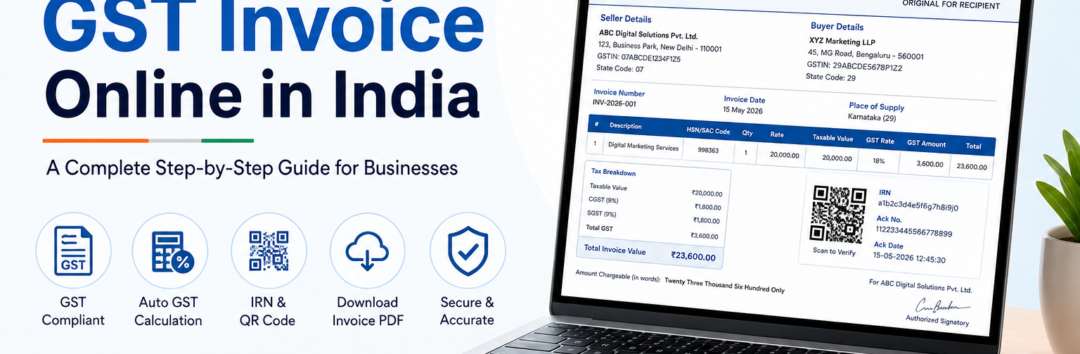
Learn how to generate GST invoice online in India with this step-by-step guide. Create GST-compliant invoices, understand GSTIN, HSN codes, e-Invoicing, and download professional invoice PDFs.
If you’re a freelancer, startup founder, retailer, consultant, agency owner, or small business in India, learning How to Generate GST Invoice Online in India is no longer optional—it’s an essential part of running a compliant business.
A professionally designed GST Invoice not only helps you get paid faster but also ensures your business complies with Goods and Services Tax (GST) regulations. Whether you’re issuing a Tax Invoice for products or services, maintaining accurate invoice records simplifies tax filing, improves financial management, and builds trust with your customers.
Today, businesses no longer need complicated accounting software or spreadsheets. Modern Online Invoice Generator tools make it possible to create a GST-Compliant Invoice within minutes. Simply enter your Legal Business Name, Business Address, customer details, tax information, and invoice items, and the software automatically performs Auto GST Calculation, generates a professional Invoice PDF, and prepares your document for sharing or printing. Many online tools even support GSTIN validation, HSN and SAC code selection, QR codes, UPI payments, and instant PDF downloads.
If your business falls under mandatory electronic invoicing, you’ll also need to understand e-Invoice, the Invoice Registration Portal (IRP), Invoice Registration Number (IRN), and the GST e-Invoicing Schema. Fortunately, these concepts are easier than they seem once you understand the complete workflow.
In this comprehensive guide, you’ll learn:
- What a GST invoice is
- Who needs to issue one
- Required invoice fields
- How to generate a GST invoice online step by step
- Common mistakes to avoid
- Best practices for GST compliance
By the end of this guide, you’ll be able to create professional GST invoices confidently using your preferred invoicing platform, including your own website, PDFInvoiceOnline.com.
What Is a GST Invoice?
A GST Invoice is an official document issued by a registered seller whenever goods or services are supplied to a customer. It acts as proof of the transaction and contains all the details required under India’s GST regulations.
Unlike a regular bill, a GST invoice includes detailed tax information that enables eligible buyers to claim Input Tax Credit (ITC). Because of this, accuracy is extremely important.
A standard GST-Compliant Invoice generally contains:
- Legal Business Name
- Business Address
- Supplier GSTIN
- Recipient GSTIN (for registered customers)
- Unique Invoice Number
- Invoice Date
- Buyer Details
- Seller Details
- Description of Goods and Services Details
- HSN Code (for goods)
- SAC Code (for services)
- Quantity and unit price
- Taxable Value
- Applicable GST Rate
- CGST, SGST, or IGST
- Place of Supply
- Complete Tax Breakdown
- Total Invoice Value
- Payment Terms
These fields ensure that both the seller and buyer maintain accurate accounting records while remaining compliant with GST law.
For example:
Suppose a digital marketing agency in Delhi provides SEO services worth ₹25,000 to a client located in Delhi.
The invoice would include:
- Seller GSTIN
- Client GSTIN
- SAC Code for digital marketing services
- Taxable Value ₹25,000
- 9% CGST
- 9% SGST
- Total GST ₹4,500
- Total Invoice Value ₹29,500
However, if the same client were located in Maharashtra, the invoice would instead charge IGST based on the applicable Place of Supply.
Understanding these tax rules helps avoid filing errors during GSTR-1 and GSTR-3B returns.
Why Should You Generate GST Invoices Online Instead of Manually?
Only a few years ago, many businesses relied on Microsoft Excel, Word templates, or handwritten bills. While these methods still work for basic record-keeping, they increase the chances of calculation mistakes, duplicate invoice numbers, and compliance issues.
Modern GST Billing Software and online invoice generators simplify the entire process.
Using an online solution offers several advantages:
1. Automatic GST Calculations
One of the biggest benefits is Auto GST Calculation.
Instead of manually calculating tax percentages, the software automatically computes:
- CGST
- SGST
- IGST
- Total GST
- Grand Total
This minimizes human error and saves valuable time.
2. Professional Invoice Templates
A clean Invoice Template improves your brand image.
Instead of sending poorly formatted invoices, you can create polished invoices featuring:
- Company logo
- Business information
- Customer details
- Payment instructions
- QR Code
- GST breakup
- Professional formatting
Your invoices look more credible and are easier for clients to understand.
3. Instant PDF Downloads
Most online tools instantly generate a printable Invoice PDF that can be shared via:
- Google Drive
- Cloud storage
- Accounting software
Since PDFs preserve formatting across devices, they are widely accepted by businesses and accountants. Many browser-based generators can produce PDF invoices without requiring software installation.
4. Better Compliance
A professional invoice generator helps ensure every mandatory GST field is included.
Many tools also provide:
- Invoice Validation
- GSTIN formatting
- Duplicate invoice detection
- Invoice numbering
- Tax calculations
- GST-ready invoice layouts
This significantly reduces compliance risks.
5. Faster Accounting
Modern invoicing platforms often support Accounting Software Integration, allowing invoices to sync directly with accounting systems.
Businesses can:
- Track payments
- Export invoices
- Manage taxes
- Prepare GST returns
- Simplify bookkeeping
Some advanced platforms even provide Invoice API functionality and Bulk e-Invoice Generation, making them ideal for businesses handling hundreds or thousands of invoices every month.
6. Ready for e-Invoicing
Businesses covered under India’s e-invoicing rules must generate invoices using the GST Portal (GSTN) ecosystem through the Invoice Registration Portal (IRP).
The invoice is assigned an Invoice Registration Number (IRN) and digitally authenticated before becoming a valid e-Invoice. The authenticated invoice includes a government-generated QR Code, which helps with verification and compliance. This process follows the prescribed GST e-Invoicing Schema and supports downstream reporting and logistics workflows
Step-by-Step Guide to Generate a GST Invoice Online in India
Now that you understand the importance of GST invoicing, let’s walk through the complete process of How to Generate GST Invoice Online in India. Whether you’re a freelancer, retailer, agency owner, manufacturer, or service provider, following these steps will help you create a GST-Compliant Invoice that meets legal requirements and presents your business professionally.
Instead of manually creating invoices in Excel or Word, using an Online Invoice Generator like PDFInvoiceOnline.com helps reduce errors, automate calculations, and save valuable time.
Step 1: Gather Your Business Information
Before generating an invoice, keep all your business details ready. These details appear on every GST Invoice and help establish your business identity while ensuring GST compliance.
Required Business Details
- Legal Business Name
- Brand or Trade Name (if applicable)
- Business Address
- Mobile Number
- Email Address
- Company Logo (Optional but Recommended)
- Supplier GSTIN
- State Code
Your GSTIN (Goods and Services Tax Identification Number) is a unique 15-digit identifier issued by the GST department. It must be entered correctly because an incorrect GSTIN can lead to return filing issues and prevent your customer from claiming Input Tax Credit (ITC).
Example:
ABC Digital Solutions Pvt. Ltd.
- GSTIN: 07ABCDE1234F1Z5
- Business Address: New Delhi
- State Code: 07
Keeping this information consistent across all invoices also makes Invoice Validation easier.
Step 2: Enter Customer Information
The next step is adding your customer’s information.
For every Tax Invoice, include accurate Buyer Details to ensure smooth accounting and GST reporting.
Buyer Details Include
- Customer Name
- Company Name
- Billing Address
- Shipping Address (if applicable)
- Mobile Number
- Email Address
- Recipient GSTIN (for registered businesses)
If you’re issuing a B2B Invoice, entering the customer’s GSTIN is mandatory. This allows the buyer to claim Input Tax Credit (ITC) and ensures accurate reporting in GSTR-1.
If the customer is an unregistered individual (B2C Invoice), you generally don’t need to mention the Recipient GSTIN.
Example
XYZ Marketing LLP
- GSTIN: 29ABCDE5678P1Z2
- Bengaluru, Karnataka
Providing complete customer details also helps avoid payment disputes and simplifies bookkeeping.
Step 3: Generate a Unique Invoice Number
Every GST invoice must have a unique Invoice Number.
According to GST regulations, duplicate invoice numbers should never be used within the same financial year.
Best Practices
✔ INV-0001
✔ INV-2026-001
✔ AUG-2026-101
Avoid using random numbering formats that are difficult to track.
A sequential numbering system makes:
- Accounting easier
- Audits smoother
- Invoice searches faster
- GST return filing more accurate
Many GST Billing Software solutions automatically generate invoice numbers, eliminating manual effort.
Also remember to mention the correct Invoice Date, as GST returns depend on the invoice issuance date.
Step 4: Add Goods or Services Details
This is one of the most important sections of a GST invoice.
Include complete Goods and Services Details for every item sold.
Each line item should contain:
- Product or Service Name
- Description
- Quantity
- Unit
- Rate
- Discount (if applicable)
- HSN Code (for goods)
- SAC Code (for services)
Understanding HSN Code
The HSN Code (Harmonized System of Nomenclature) is used for classifying goods.
Example:
Laptop
HSN Code: 8471
Office Chair
HSN Code: 9401
Using the correct HSN Code ensures proper tax classification and reduces the chances of GST notices.
Understanding SAC Code
The SAC Code (Services Accounting Code) applies to services.
Examples include:
- Digital Marketing Services
- Legal Consultancy
- Graphic Design
- Software Development
- Website Development
Selecting the appropriate SAC Code helps determine the correct GST rate for services.
Step 5: Calculate the Taxable Value
After entering all products or services, calculate the Taxable Value.
The taxable value is the amount before GST is applied.
Example
SEO Services
Quantity: 1
Rate: ₹20,000
Discount: ₹2,000
Taxable Value = ₹18,000
GST is always calculated on the taxable value, not on the original amount.
Most Online Invoice Generator tools automatically perform this calculation, minimizing errors.
Step 6: Select the Correct GST Rate
Different goods and services attract different GST percentages.
Common GST slabs include:
- 5%
- 12%
- 18%
- 28%
Choosing the correct GST Rate is essential for accurate tax reporting.
For example:
Digital Marketing Services generally attract 18% GST.
Some food items may attract 5%.
Luxury goods may attract 28%.
Reliable invoicing software offers Auto GST Calculation, automatically computing tax based on the selected rate.
Step 7: Understand CGST, SGST, and IGST
One of the most common questions business owners ask while learning How to Generate GST Invoice Online in India is when to apply CGST, SGST, or IGST.
The answer depends on the Place of Supply.
When to Charge CGST + SGST
If both the supplier and buyer are located in the same state, GST is divided equally into:
- CGST
- SGST
Example
Supplier: Delhi
Buyer: Delhi
Invoice Amount: ₹10,000
GST Rate: 18%
CGST = ₹900
SGST = ₹900
Total GST = ₹1,800
Grand Total = ₹11,800
When to Charge IGST
If the supplier and customer belong to different states, charge only IGST.
Example
Supplier: Delhi
Buyer: Maharashtra
Invoice Amount: ₹10,000
GST Rate: 18%
IGST = ₹1,800
Grand Total = ₹11,800
Understanding the Place of Supply rules is crucial because applying the wrong tax type can create compliance issues and require later corrections.
Step 8: Show a Complete Tax Breakdown
Every GST-Compliant Invoice should clearly display a Tax Breakdown.
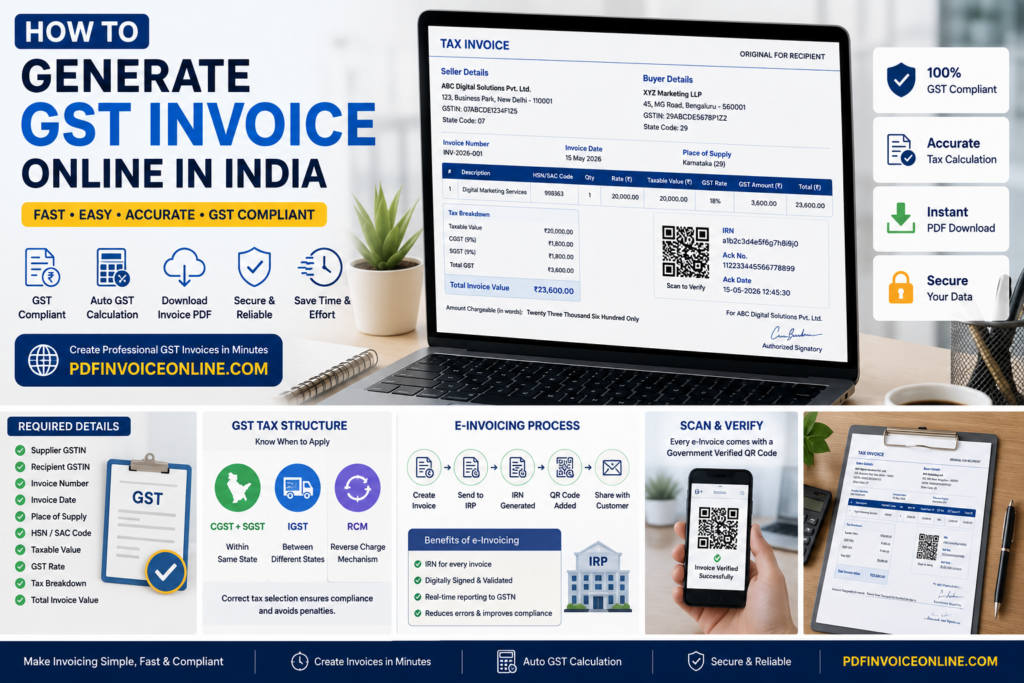
An ideal invoice includes:
| Particular | Amount |
|---|---|
| Taxable Value | ₹20,000 |
| CGST (9%) | ₹1,800 |
| SGST (9%) | ₹1,800 |
| Total GST | ₹3,600 |
| Total Invoice Value | ₹23,600 |
A transparent tax breakdown improves customer trust and simplifies accounting for both parties.
Step 9: Add Payment Terms
Clear Payment Terms help avoid confusion and reduce payment delays.
Include details such as:
- Payment Due Date
- Advance Payment (if any)
- Accepted Payment Methods
- UPI ID
- Bank Account Details
- Late Payment Charges (if applicable)
Many businesses also include a payment QR Code on the invoice, allowing customers to pay instantly using UPI-enabled apps. This speeds up collections and provides a smoother payment experience.
Step 10: Review and Download the Invoice
Before sending the invoice to your customer, review every detail carefully.
Double-check:
- Legal Business Name
- Business Address
- Supplier GSTIN
- Recipient GSTIN
- Invoice Number
- Invoice Date
- HSN or SAC Code
- GST Rate
- Taxable Value
- Tax Breakdown
- Total Invoice Value
- Payment Terms
Once verified, generate the final Invoice PDF. A PDF format preserves the layout across devices and is suitable for email, printing, and record-keeping. If your business uses accounting or ERP systems, many invoicing platforms also support Accounting Software Integration, allowing invoices to sync automatically and reducing manual data entry.
GST e-Invoicing, Compliance, and Advanced Features
As your business grows, generating a basic GST Invoice may no longer be enough. Businesses with higher transaction volumes or those covered under India’s e-invoicing regulations must follow additional compliance requirements. Understanding these concepts will help you stay compliant, avoid penalties, and streamline your invoicing process.
What Is an e-Invoice?
An e-Invoice (Electronic Invoice) is a GST invoice that is electronically authenticated through the government’s Invoice Registration Portal (IRP) before it is shared with the buyer.
Unlike a regular PDF invoice, an e-Invoice is validated by the GST system, making it easier for businesses to file returns and maintain accurate records.
An e-Invoice contains all the mandatory invoice details along with government-generated identifiers such as:
- Invoice Registration Number (IRN)
- Digitally signed JSON data
- Government-generated QR Code
- Validation details from the IRP
It’s important to understand that an e-Invoice is not a different type of invoice. Instead, it is a standard GST invoice that has been registered and authenticated through the government’s e-invoicing system.
When Is e-Invoicing Mandatory?
The Government of India has introduced e-invoicing requirements for businesses exceeding specified turnover thresholds. These limits may change over time, so businesses should always verify the latest notifications issued by the GST authorities.
If your business falls under the mandatory criteria, every applicable B2B Invoice must be registered before it is issued to the customer.
Using modern GST Billing Software makes this process almost automatic, reducing manual work and ensuring compliance.
How the Invoice Registration Portal (IRP) Works
The Invoice Registration Portal (IRP) acts as the validation system for e-Invoices.
Here’s a simplified workflow:
Step 1
Create your invoice using an Online Invoice Generator or your accounting software.
Step 2
The invoice data is converted into the prescribed GST e-Invoicing Schema, which uses a standardized Machine-Readable Invoice Format.
Step 3
The invoice information is submitted to the IRP either directly or through an authorized GST Suvidha Provider (GSP) or an Invoice API.
Step 4
The portal validates:
- Supplier GSTIN
- Recipient GSTIN
- Invoice Number
- Invoice Date
- Invoice values
- GST calculations
Step 5
After successful validation, the IRP generates an Invoice Registration Number (IRN) and digitally signs the invoice.
Step 6
The authenticated invoice is returned with an embedded QR Code, making it ready for sharing with the customer.
This automated process improves accuracy and reduces duplicate invoices.
Understanding the Invoice Registration Number (IRN)
The Invoice Registration Number (IRN) is a unique reference generated by the Invoice Registration Portal for every valid e-Invoice.
Think of the IRN as the digital identity of your invoice.
It helps:
- Prevent duplicate invoices
- Improve invoice traceability
- Simplify GST audits
- Verify invoice authenticity
Businesses should store the IRN along with the invoice for future reference and compliance purposes.
Why the QR Code Matters
Every authenticated e-Invoice contains a government-generated QR Code.
This QR Code enables tax officers and businesses to verify invoice authenticity instantly.
Scanning the QR Code typically reveals key information such as:
- Supplier GSTIN
- Recipient GSTIN
- Invoice Number
- Invoice Date
- Invoice Value
- IRN
Many businesses also include a separate UPI payment QR code to help customers make faster payments. Ensure this payment QR code is clearly distinguished from the government-issued e-Invoice QR code.
GST Portal (GSTN) and Return Filing
The GST Portal (GSTN) is the central platform for GST registration, return filing, and tax management.
Invoices generated correctly throughout the month make GST return filing significantly easier.
Your invoices directly impact returns such as:
GSTR-1
GSTR-1 contains outward supply details.
The information submitted includes:
- Invoice Number
- Invoice Date
- Customer GSTIN
- Taxable Value
- GST Rate
- Tax amount
Accurate invoices reduce mismatches and improve compliance.
GSTR-3B
GSTR-3B is the monthly summary return.
Since GST liability is calculated using invoice data, errors in invoices can lead to incorrect tax payments.
Maintaining accurate invoice records helps ensure that both GSTR-1 and GSTR-3B remain consistent.
Reverse Charge Mechanism (RCM)
Some transactions fall under the Reverse Charge Mechanism (RCM).
Under RCM, the responsibility for paying GST shifts from the supplier to the recipient.
When applicable, your invoice should clearly indicate that GST is payable under Reverse Charge.
Businesses should verify whether a transaction is covered under RCM before issuing the invoice, as the rules vary based on the type of goods or services and applicable GST notifications.
When Is an e-Way Bill Required?
An e-Way Bill is generally required for the movement of goods above the prescribed value limit under GST law.
Although the e-Way Bill is different from a GST invoice, both documents often work together during transportation.
An e-Way Bill usually includes information such as:
- Supplier details
- Buyer details
- Vehicle information
- Invoice Number
- Invoice Date
- Goods description
Businesses involved in logistics, manufacturing, wholesale, or distribution should ensure consistency between the invoice and the e-Way Bill to avoid compliance issues during transit.
Invoice Validation Before Sending
One of the easiest ways to avoid GST-related mistakes is to perform proper Invoice Validation before sharing the invoice with your customer.
Always verify:
- Supplier GSTIN
- Recipient GSTIN
- Invoice Number
- Invoice Date
- HSN Code or SAC Code
- GST Rate
- Taxable Value
- Place of Supply
- Tax Breakdown
- Total Invoice Value
Most modern invoicing tools perform several of these checks automatically, reducing manual errors.
Invoice Amendment and Invoice Cancellation
Mistakes can happen, even after an invoice has been generated.
Invoice Amendment
An Invoice Amendment is used when specific details need to be corrected, such as:
- Incorrect customer information
- Wrong GST rate
- Incorrect taxable value
- Typographical errors
- Product description updates
Any amendment should follow GST regulations and be properly reflected in the relevant GST return.
Invoice Cancellation
Sometimes an invoice must be cancelled due to reasons such as:
- Duplicate invoice creation
- Order cancellation
- Incorrect customer selection
- Data entry mistakes
An Invoice Cancellation should be performed promptly and documented properly. For e-Invoices, cancellation must also comply with the rules and timelines prescribed by the GST system.
Using Invoice APIs and Bulk e-Invoice Generation
Businesses that issue a large number of invoices each day can benefit from automation.
An Invoice API allows your website, ERP, CRM, or billing system to automatically generate invoices without manual intervention.
Benefits include:
- Faster invoice generation
- Reduced human error
- Real-time synchronization
- Automatic tax calculations
- Easy integration with accounting platforms
For enterprises, Bulk e-Invoice Generation enables hundreds or thousands of invoices to be processed efficiently, making it ideal for eCommerce businesses, manufacturers, distributors, and service providers with high transaction volumes.
Best Practices for GST Invoice Compliance
To maintain accurate records and ensure smooth GST compliance:
- Use a consistent invoice numbering system.
- Verify GSTIN details before issuing invoices.
- Select the correct HSN Code or SAC Code.
- Apply the correct GST Rate based on the Place of Supply.
- Clearly display the Tax Breakdown and Total Invoice Value.
- Keep digital copies of every Invoice PDF.
- Regularly reconcile invoice data with GSTR-1 and GSTR-3B.
- Use secure software that supports e-Invoicing and automated validation.
- Review invoices carefully before sending them to customers.
By following these practices, businesses can reduce compliance risks, improve operational efficiency, and build trust with customers.
Common GST Invoice Mistakes to Avoid
Even experienced business owners occasionally make invoicing mistakes. While some errors are minor, others can affect GST compliance, delay customer payments, or create problems during return filing. The good news is that most mistakes are preventable by following a consistent invoicing process.
1. Entering an Incorrect GSTIN
Your GSTIN (Goods and Services Tax Identification Number) is one of the most important details on a GST Invoice.
An incorrect Supplier GSTIN or Recipient GSTIN can result in:
- Rejection of Input Tax Credit (ITC)
- Mismatch in GST returns
- Customer disputes
- Additional compliance work
Best Practice: Always verify GSTIN details before issuing the invoice.
2. Using Duplicate Invoice Numbers
Every invoice should have a unique Invoice Number.
Duplicate invoice numbers can create confusion during audits and GST return filing.
Best Practice:
Maintain a sequential numbering format such as:
- INV-2026-001
- INV-2026-002
- INV-2026-003
Most invoice generators automate this process.
3. Applying the Wrong GST Rate
Different products and services attract different GST slabs.
Charging an incorrect GST Rate can lead to:
- Incorrect tax collection
- Customer complaints
- GST notices
- Additional tax liability
Always confirm the applicable GST rate before issuing the invoice.
4. Choosing the Wrong Tax Type
Many businesses mistakenly apply CGST and SGST instead of IGST, or vice versa.
Remember:
- Same State → CGST + SGST
- Different States → IGST
The decision depends on the Place of Supply.
5. Incorrect HSN or SAC Codes
Using the wrong HSN Code or SAC Code can result in incorrect tax classification.
Examples include:
- Goods → HSN Code
- Services → SAC Code
Always use the latest classification applicable to your products or services.
6. Missing Mandatory Invoice Information
A valid GST-Compliant Invoice should always include:
- Legal Business Name
- Business Address
- Supplier GSTIN
- Buyer Details
- Seller Details
- Invoice Number
- Invoice Date
- Goods and Services Details
- Taxable Value
- GST Rate
- Tax Breakdown
- Total Invoice Value
- Payment Terms
Missing mandatory information may affect compliance and customer trust.
7. Ignoring Invoice Validation
Before sending an invoice, review it carefully.
Perform Invoice Validation by checking:
- Customer information
- Tax calculations
- Invoice totals
- GSTIN
- Invoice numbering
- Product details
A quick review can prevent unnecessary corrections later.
8. Delaying Invoice Cancellation or Amendment
If an invoice contains incorrect information, act quickly.
Use:
- Invoice Amendment for corrections.
- Invoice Cancellation when the invoice should no longer be valid.
For businesses using e-Invoicing, follow the applicable GST rules and timelines.
Expert Tips for Creating Professional GST Invoices
After working with thousands of businesses, one thing becomes clear—professional invoices help businesses get paid faster.
Here are some practical recommendations.
Use Professional Branding
Include:
- Company logo
- Brand colors
- Contact information
- Website address
Professional invoices create a positive impression and reinforce your business identity.
Clearly Mention Payment Terms
Avoid confusion by specifying:
- Due date
- Payment methods
- Bank details
- UPI details
- Late payment policy
Clear Payment Terms encourage timely payments.
Save Every Invoice PDF
Always keep a copy of every Invoice PDF.
Cloud storage solutions make it easier to retrieve invoices during audits or customer inquiries.
Automate Wherever Possible
Instead of creating invoices manually, use an Online Invoice Generator or GST Billing Software.
Automation helps with:
- Auto GST Calculation
- Invoice numbering
- PDF generation
- Tax calculations
- Accounting Software Integration
This saves time while reducing human errors.
Keep Records Updated
Maintain digital records of:
- Customer information
- Products
- GST rates
- HSN codes
- SAC codes
- Invoice history
Well-organized records make return filing much easier.
Frequently Asked Questions
Can I generate a GST invoice online for free?
Yes. Several online tools allow businesses to create GST-compliant invoices for free. Platforms like PDFInvoiceOnline.com let you generate professional invoices without requiring complicated software.
Is GSTIN mandatory on every invoice?
If you are GST-registered, your Supplier GSTIN must appear on every GST invoice. The Recipient GSTIN should also be included when invoicing another GST-registered business.
What is the difference between a GST Invoice and an e-Invoice?
A GST Invoice is the standard tax invoice issued for the supply of goods or services.
An e-Invoice is a GST invoice that has been electronically authenticated through the Invoice Registration Portal (IRP) and assigned an Invoice Registration Number (IRN).
What is the difference between CGST, SGST and IGST?
- CGST applies to intra-state transactions.
- SGST applies alongside CGST for intra-state transactions.
- IGST applies to inter-state transactions.
The applicable tax depends on the Place of Supply.
Do freelancers need GST invoices?
If a freelancer is registered under GST, they should issue GST invoices for taxable services and comply with applicable GST regulations.
Is a QR Code mandatory?
A government-generated QR Code is mandatory for applicable e-Invoices. Businesses may also include a separate payment QR code for customer convenience.
Can I edit an invoice after sending it?
Yes, depending on the situation. You may need to use an Invoice Amendment or Invoice Cancellation while following GST rules.
Which businesses should use GST Billing Software?
Businesses with frequent invoicing, multiple clients, recurring billing, or high transaction volumes benefit significantly from using GST billing software or an online invoice generator.
Final Thoughts
Learning How to Generate GST Invoice Online in India is an essential skill for every modern business. A well-prepared invoice is more than just a payment request—it reflects your professionalism, supports GST compliance, and simplifies accounting.
By including accurate business details, customer information, tax calculations, and mandatory GST fields, you can issue invoices confidently while reducing the risk of errors.
Modern invoicing platforms make the entire process faster by automating calculations, generating professional PDF invoices, validating invoice data, and supporting advanced features such as e-Invoicing, accounting integrations, and secure record management.
Whether you’re a freelancer, startup, retailer, consultant, or growing enterprise, adopting an efficient online invoicing solution can save time, improve cash flow, and help your business stay compliant as it scales.
If you’re looking for a simple and reliable way to create professional GST invoices, visit PDFInvoiceOnline.com. You can generate clean, GST-compliant invoices in minutes, download them as PDFs, and streamline your billing process without the complexity of traditional accounting software.
Also Read: Best Free Invoice Templates for Small Businesses