 Post by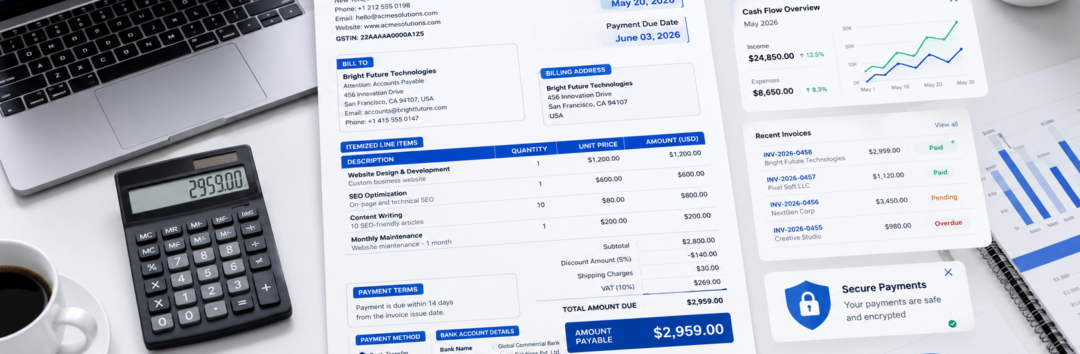
Learn the essential elements every invoice must include, from invoice number and payment due date to taxes, payment terms, and bank details. Create professional invoices that get paid faster.
Essential Elements Every Invoice Must Include
Invoices are much more than simple payment requests—they’re official business documents that serve as financial records, legal proof of transactions, and communication tools between buyers and sellers. Whether you’re a freelancer, contractor, startup founder, eCommerce seller, consultant, or established business owner, creating a complete and professional invoice can significantly improve your cash flow while reducing disputes.
Unfortunately, many businesses still send incomplete invoices that lack important information. Something as simple as forgetting the Payment due date or omitting an Invoice number can delay payments, create accounting confusion, or even lead to tax compliance issues.
A professionally designed invoice clearly communicates what was sold, who purchased it, how much is owed, when payment is expected, and how the customer should pay. Every detail contributes to building trust while ensuring smooth bookkeeping and easier auditing.
In this comprehensive guide, you’ll learn the essential elements every invoice must include, why each one matters, common mistakes to avoid, and practical tips for creating invoices that look professional and get paid on time.
Why Every Invoice Needs Standardized Information
Think of an invoice as the financial identity card of a transaction. Every invoice tells a complete story—from the products or services provided to the agreed payment terms.
Without standardized invoice information, businesses often experience:
- Delayed payments
- Customer disputes
- Accounting errors
- Tax filing complications
- Duplicate invoices
- Lost financial records
Including all essential invoice elements creates transparency for both parties. Buyers understand exactly what they’re paying for, while sellers maintain accurate records for tax reporting and financial management.
Whether you’re invoicing a single freelance project or thousands of monthly customers, consistency is the key to professionalism.
1. Start with a Unique Invoice Number
One of the most important pieces of information is the Invoice number.
An invoice number is a unique identifier assigned to every invoice you create. It helps both your business and your customer track payments, organize accounting records, and reference specific transactions quickly.
For example:
- INV-1001
- INV-2026-00045
- WEB-0789
A good numbering system should:
- Never repeat numbers
- Follow a logical sequence
- Be easy to search
- Support accounting software
Many businesses also include an Invoice reference number when linking invoices to quotations, contracts, subscriptions, or previous billing records. While the invoice number identifies the invoice itself, the invoice reference number may connect it with a larger project or agreement.
Using unique identifiers reduces confusion when customers contact support regarding payment questions.
2. Clearly Display the Invoice Issue Date and Payment Due Date
Every invoice should prominently display the Invoice issue date.
This date indicates when the invoice was officially created and sent to the customer.
Equally important is the Payment due date, which specifies exactly when payment is expected.
Instead of writing vague instructions like:
“Please pay soon.”
Use clear information such as:
- Invoice Issue Date: July 28, 2026
- Payment Due Date: August 12, 2026
Clear dates provide several benefits:
- Improve payment discipline
- Reduce misunderstandings
- Support legal enforcement if necessary
- Help accounting teams manage receivables
- Improve cash flow forecasting
Businesses using accounting software often automate reminders based on the payment due date, reducing late payments significantly.
3. Include Complete Seller and Buyer Information
Every professional invoice identifies both parties involved in the transaction.
Your Seller (business) information should include:
- Business name
- Company logo (optional)
- Registered address
- Phone number
- Website
Accurate business identification demonstrates professionalism while helping customers verify who issued the invoice.
Likewise, your Buyer (customer) information should include:
- Customer name
- Company name (if applicable)
- Contact person
- Customer ID (optional)
- Email address
The customer’s Billing address is equally important.
The billing address confirms where the invoice is officially issued and may be required for taxation, corporate accounting, and purchase approval workflows.
For example:
Seller Information
ABC Digital Solutions
245 Business Avenue
New York, NY
Buyer Information
XYZ Marketing Agency
152 Commerce Street
Chicago, IL
Having complete identification protects both businesses if questions arise later.
Contact Information Matters More Than You Think
Many invoices fail because customers don’t know whom to contact with billing questions.
Always include clear Contact information, such as:
- Email address
- Phone number
- Support department
- Accounts receivable contact
This simple addition speeds up issue resolution and prevents payment delays caused by unanswered questions.
For larger organizations, adding separate billing support information can significantly improve communication.
4. Describe Every Product or Service Clearly
Perhaps the most overlooked section of an invoice is the description of what was actually sold.
Every invoice should contain detailed Itemized line items.
Rather than writing:
Consulting Services
Write something more descriptive:
| Product or Service | Description |
|---|---|
| SEO Audit | Comprehensive website SEO analysis including technical audit and keyword research |
| Content Writing | Five SEO blog articles (2,000 words each) |
| Website Maintenance | Monthly maintenance and security updates |
Each Product or service description should clearly explain the work completed or goods delivered.
Detailed descriptions reduce disputes because customers understand exactly what they are paying for.
Include Quantity and Unit Price
Every line item should include the Quantity delivered.
Examples include:
- 10 hours
- 5 products
- 3 licenses
- 12 subscriptions
Next comes the Unit price, representing the cost for each individual item or service.
For example:
| Description | Quantity | Unit Price |
|---|---|---|
| Graphic Design | 8 Hours | $60 |
| Website Hosting | 12 Months | $15 |
This transparency helps customers verify calculations independently.
Calculate the Subtotal Correctly
Once all line items are listed, calculate the Subtotal.
The subtotal represents the total value before taxes, shipping, discounts, or additional charges are applied.
Example:
| Item | Amount |
|---|---|
| Website Design | $900 |
| SEO Optimization | $400 |
Subtotal:
$1,300
Using a subtotal allows customers to understand how the final invoice total is calculated.
It also simplifies tax reporting and internal accounting.
Apply Discounts Transparently
Businesses frequently offer promotional pricing, loyalty discounts, or negotiated rates.
Whenever this happens, clearly show the Discount amount.
Instead of silently reducing the total, display it separately.
Example:
Subtotal: $1,300
Discount Amount:
-$150
Adjusted Total:
$1,150
Displaying discounts increases customer satisfaction because buyers can clearly see the savings they received.
It also improves transparency during audits and financial reconciliation.
Prepare for Taxes and Additional Charges
After calculating the discounted subtotal, businesses typically add taxes and other applicable costs.
The next section of this guide will explain how to correctly include Applicable taxes (VAT/GST/Sales Tax), Tax identification number (TIN/VAT ID), Additional fees or charges, Shipping charges, and calculate the final Total amount due while ensuring compliance with accounting and tax requirements.
We’ll also cover payment instructions, remittance details, bank account information, purchase order numbers, invoice status, payment methods, and several best practices that help businesses get paid faster.
5. Calculate Taxes, Fees, and the Final Total Correctly
Once you’ve calculated the Subtotal and applied any Discount amount, the next step is to determine the final amount your customer needs to pay. This section is where many invoicing mistakes occur, especially for businesses operating in multiple states or countries with different tax regulations.
A professional invoice should always display Applicable taxes (VAT/GST/Sales Tax) separately rather than including them in the product price without explanation. Transparent tax calculations help customers understand exactly how the final amount was determined and make bookkeeping much easier.
For example:
| Description | Amount |
|---|---|
| Subtotal | $2,000.00 |
| Discount Amount | -$100.00 |
| Taxable Amount | $1,900.00 |
| Applicable Taxes (VAT/GST/Sales Tax) | $190.00 |
| Shipping Charges | $35.00 |
| Additional Fees or Charges | $15.00 |
| Total Amount Due | $2,140.00 |
Displaying each component separately minimizes disputes because customers can easily verify every calculation.
Include Your Tax Identification Number
Many jurisdictions require businesses to display their Tax identification number (TIN/VAT ID) on invoices.
Depending on your country, this may be:
- VAT Number
- GST Number
- Sales Tax Registration Number
- Employer Identification Number (EIN)
- Taxpayer Identification Number (TIN)
Including the correct tax identification number:
- Demonstrates legal compliance
- Simplifies tax audits
- Helps customers claim eligible tax credits
- Supports accurate accounting records
Businesses selling internationally should also ensure their tax information complies with the regulations of both the seller’s and buyer’s jurisdictions.
Don’t Forget Shipping Charges
If physical goods are delivered, clearly list Shipping charges.
Avoid bundling shipping costs into product prices because customers appreciate knowing exactly what they’re paying for.
For example:
- Standard Shipping
- Express Delivery
- International Shipping
- Freight Charges
Showing shipping separately also helps businesses analyze logistics costs and improve pricing strategies over time.
Explain Additional Fees Clearly
Some transactions involve costs beyond products and shipping.
These may include Additional fees or charges, such as:
- Installation fees
- Setup charges
- Customization costs
- Rush service fees
- Handling fees
- Packaging charges
- Processing fees
Whenever additional fees apply, include a brief explanation next to each charge.
Instead of writing:
Additional Fee — $50
Write:
Priority Setup Service — $50
Specific descriptions improve transparency and reduce customer questions.
6. Define Clear Payment Terms
One of the biggest reasons invoices remain unpaid is unclear expectations.
Every invoice should include well-defined Payment terms that explain when and how payment should be made.
Common examples include:
- Due upon receipt
- Net 7
- Net 15
- Net 30
- Net 45
- Installment schedule
- Milestone-based payment
For example:
Payment Terms: Net 30
This means payment is expected within 30 days from the Invoice issue date.
Clearly stated payment terms:
- Improve cash flow
- Reduce confusion
- Support collections if payment becomes overdue
- Help customers plan their own accounts payable schedule
Whenever possible, agree on payment terms before beginning work rather than after delivering products or services.
Specify Accepted Payment Methods
Customers should never have to ask how they can pay.
Always list every available Payment method directly on the invoice.
Examples include:
- Bank Transfer
- ACH Transfer
- Credit Card
- Debit Card
- PayPal
- Stripe
- UPI
- Check
- Cash (if applicable)
Offering multiple payment methods often increases the likelihood of receiving payment quickly because customers can choose the option that’s most convenient for them.
Provide Complete Payment Instructions
Along with accepted payment methods, include detailed Payment instructions.
For example:
Please transfer payment within 30 days using the invoice number as the payment reference.
Or:
Credit card payments can be completed through the secure payment link included with this invoice.
Clear payment instructions reduce back-and-forth communication and eliminate uncertainty.
Include Remittance Details
For businesses accepting bank transfers, Remittance details are essential.
These details help customers notify you once payment has been sent and allow accounting teams to match incoming payments with the correct invoice.
Typical remittance details include:
- Invoice Number
- Amount Paid
- Payment Date
- Bank Reference Number
- Transaction ID
Proper remittance information significantly speeds up payment reconciliation.
Share Accurate Bank Account Details
If bank transfer is your preferred payment option, always include complete Bank account details.
This may include:
- Account Name
- Bank Name
- Account Number
- Routing Number
- SWIFT/BIC Code
- IBAN (where applicable)
Double-check every digit before sending an invoice. Incorrect bank information can delay payment for days or even weeks.
Many businesses verify bank details during onboarding and keep them consistent across all invoices.
7. Reference Related Business Documents
Invoices rarely exist in isolation. They often connect to quotations, contracts, subscriptions, or purchase approvals.
Including relevant references helps customers process invoices faster.
Purchase Order Number
Large companies often require a Purchase order (PO) number before approving payment.
A purchase order acts as formal authorization for the purchase.
When your invoice includes the matching PO number:
- Finance teams can verify approvals quickly.
- Payments move through internal workflows faster.
- Administrative delays are reduced.
For example:
Purchase Order (PO) Number: PO-2026-4587
If your customer provided a PO during the ordering process, always include it on the invoice.
Invoice Reference Number
Some businesses also assign an Invoice reference number to connect related transactions.
Examples include linking an invoice to:
- Service contracts
- Project IDs
- Subscription renewals
- Customer accounts
- Previous invoices
- Credit notes
This additional reference simplifies record-keeping, particularly for long-term projects with multiple invoices.
Display Invoice Status Clearly
Businesses increasingly send digital invoices that progress through different stages.
Including an Invoice status helps everyone understand where the payment currently stands.
Common statuses include:
- Draft
- Sent
- Viewed
- Partially Paid
- Paid
- Overdue
- Cancelled
- Refunded
Modern invoicing software updates invoice status automatically, allowing both businesses and customers to track progress in real time.
For recurring billing, invoice status also helps accounting teams identify overdue accounts before they become major collection issues.
Add Your Business Registration Information
Professional invoices should also display the company’s Business registration number where required by local regulations.
Depending on your jurisdiction, this may be:
- Company Registration Number
- Certificate of Incorporation Number
- Business License Number
- Corporate Identification Number
Displaying your registration details:
- Builds customer confidence
- Demonstrates legitimacy
- Supports regulatory compliance
- Simplifies audits and legal verification
Many customers—especially larger organizations—expect this information before processing payments.
Present the Amount Payable Clearly
Finally, ensure the Amount payable is prominently displayed.
While it may seem similar to the Total amount due, the amount payable should represent the exact figure the customer must pay after accounting for all taxes, discounts, shipping costs, and additional fees.
Make it stand out by using:
- Larger font size
- Bold formatting
- A highlighted summary box
- Contrasting background color (for digital invoices)
A clearly visible amount payable reduces confusion and makes it easier for customers to complete payment without double-checking calculations.
Common Invoice Mistakes That Delay Payments
Even experienced businesses make invoicing mistakes. Here are some of the most common issues to avoid:
- Missing or duplicate invoice numbers.
- Forgetting the payment due date.
- Incomplete seller or buyer information.
- Vague product or service descriptions.
- Incorrect quantity or unit price calculations.
- Missing tax details or tax identification number.
- Omitting payment instructions.
- Leaving out purchase order numbers for corporate clients.
- Incorrect bank account details.
- Mathematical errors in totals.
- Forgetting to include shipping or additional fees.
- Sending invoices without clear contact information.
A quick review before sending each invoice can prevent these problems and improve your payment collection rate.
Best Practices for Creating Professional Invoices
To create invoices that inspire confidence and encourage prompt payment:
- Use a consistent invoice template across your business.
- Assign invoice numbers sequentially.
- Send invoices promptly after delivering products or services.
- Keep descriptions detailed but easy to understand.
- Break down every cost transparently.
- Double-check all calculations before sending.
- Include multiple payment options whenever possible.
- Store copies of every invoice securely for future reference.
- Follow up politely if payment becomes overdue.
- Use invoicing software to automate reminders and reduce manual errors.
These habits not only improve operational efficiency but also strengthen your professional reputation.
Expert Tips for Creating Invoices That Get Paid Faster
A well-designed invoice does more than request payment—it reflects your professionalism and reinforces trust with your customers. Whether you’re a freelancer sending one invoice a month or a growing business managing hundreds of transactions, following a few proven practices can significantly improve your payment cycle.
1. Send Invoices Immediately
One of the easiest ways to improve cash flow is to invoice as soon as work is completed or goods are delivered. Waiting several days—or even weeks—can delay payment and increase the likelihood of customers overlooking the invoice.
For recurring services, automate invoice generation so each invoice is sent on the scheduled billing date.
2. Keep Your Invoice Layout Clean
Your invoice should be easy to scan within a few seconds.
Use:
- Clear headings
- Consistent fonts
- Adequate spacing
- Professional branding
- Logical sections
- Easy-to-read totals
Avoid cluttering the invoice with unnecessary graphics or lengthy paragraphs.
3. Automate Recurring Billing
Businesses offering subscriptions, retainers, or maintenance services can benefit from automated invoicing.
Automation helps:
- Reduce manual work
- Eliminate missed invoices
- Send payment reminders automatically
- Update Invoice status in real time
- Improve recordkeeping
Modern invoicing software can also automatically assign the next Invoice number, calculate taxes, and track outstanding balances.
4. Review Every Invoice Before Sending
Even a small mistake can delay payment.
Before clicking “Send,” verify:
- Customer name
- Buyer (customer) information
- Billing address
- Product descriptions
- Pricing
- Tax calculations
- Due dates
- Bank information
- Contact details
A two-minute review often prevents days of unnecessary follow-up.
5. Make Payment Easy
Customers are more likely to pay quickly when the payment process is simple.
Include:
- Multiple Payment method options
- Clear Payment instructions
- Accurate Bank account details
- Complete Remittance details
Removing payment friction often results in faster collections.
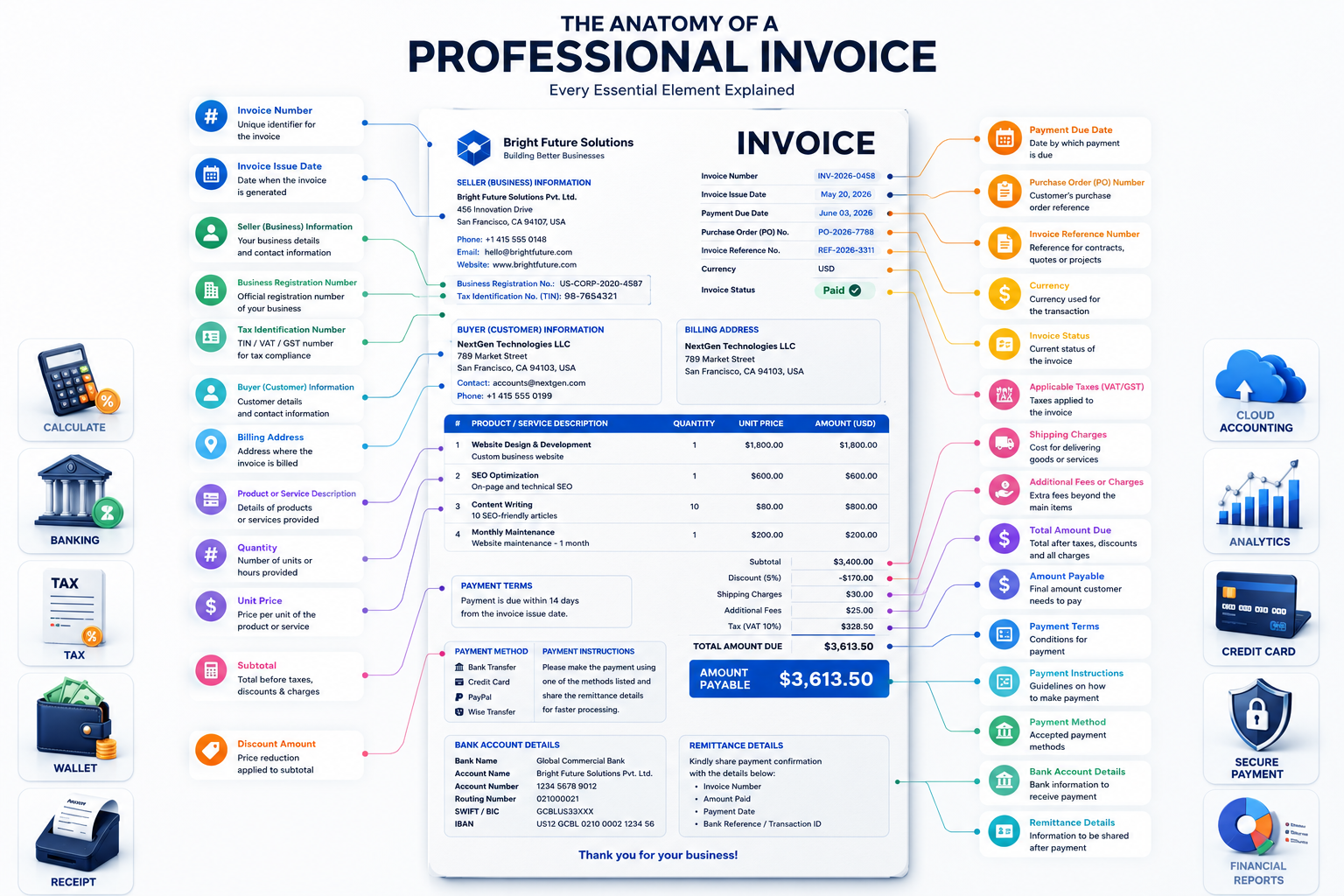
Sample Invoice Structure
Here’s an example of how the essential information can be organized on a professional invoice.
| Section | Information Included |
|---|---|
| Invoice Header | Company Logo, Invoice Title, Invoice number, Invoice issue date |
| Business Information | Seller (business) information, Business registration number, Tax identification number (TIN/VAT ID) |
| Customer Information | Buyer (customer) information, Billing address, Contact information |
| Invoice Details | Purchase order (PO) number, Invoice reference number, Currency |
| Products & Services | Itemized line items, Product or service description, Quantity, Unit price |
| Pricing Summary | Subtotal, Discount amount, Applicable taxes (VAT/GST/Sales Tax), Shipping charges, Additional fees or charges, Total amount due, Amount payable |
| Payment Section | Payment terms, Payment due date, Payment method, Payment instructions, Bank account details, Remittance details |
| Status | Invoice status |
Following this structure ensures your invoices remain organized, compliant, and easy for customers to process.
FAQs
1. Why is an invoice number important?
An Invoice number uniquely identifies each invoice. It simplifies accounting, helps track payments, prevents duplicate records, and makes it easier to locate invoices during audits or customer inquiries.
2. What is the difference between the invoice issue date and the payment due date?
The Invoice issue date is when the invoice is created and sent to the customer. The Payment due date specifies the deadline by which payment should be received according to the agreed Payment terms.
3. Should every invoice include tax information?
Yes. If taxes apply, your invoice should clearly show Applicable taxes (VAT/GST/Sales Tax) along with your Tax identification number (TIN/VAT ID) if required by local regulations. This promotes transparency and helps customers maintain accurate tax records.
4. Why should invoices include detailed product descriptions?
A clear Product or service description, along with Itemized line items, Quantity, and Unit price, helps customers understand exactly what they are paying for. This reduces misunderstandings and minimizes billing disputes.
5. What is the purpose of a purchase order number?
A Purchase order (PO) number links the invoice to the customer’s approved purchase request. Many medium and large organizations require a matching PO number before authorizing payment.
6. How should discounts be displayed?
Always list the Discount amount separately instead of silently reducing the price. Showing the original subtotal and the discount improves transparency and highlights the value offered to the customer.
7. What payment information should an invoice contain?
A professional invoice should include accepted Payment method options, detailed Payment instructions, accurate Bank account details, and Remittance details so customers know exactly how to complete the payment.
8. What is the difference between the total amount due and the amount payable?
The Total amount due summarizes the invoice after adding taxes and applicable charges. The Amount payable is the exact amount the customer must pay after considering discounts, shipping, taxes, and any other adjustments. In many invoices, these values are the same, but they may differ if credits or advance payments have already been applied.
9. Why should businesses include their registration details?
Displaying your Business registration number reassures customers that they are dealing with a legitimate company and may be required for regulatory compliance in many jurisdictions.
10. What currency should an invoice use?
Always specify the Currency used for pricing and payment, especially when working with international clients. Clearly indicating the currency prevents confusion and avoids payment errors.
Final Invoice Checklist
Before sending your next invoice, make sure you’ve included every essential element:
- ✅ Invoice number
- ✅ Invoice issue date
- ✅ Payment due date
- ✅ Seller (business) information
- ✅ Buyer (customer) information
- ✅ Billing address
- ✅ Contact information
- ✅ Business registration number
- ✅ Tax identification number (TIN/VAT ID)
- ✅ Purchase order (PO) number (if applicable)
- ✅ Invoice reference number
- ✅ Currency
- ✅ Itemized line items
- ✅ Product or service description
- ✅ Quantity
- ✅ Unit price
- ✅ Subtotal
- ✅ Discount amount
- ✅ Applicable taxes (VAT/GST/Sales Tax)
- ✅ Shipping charges
- ✅ Additional fees or charges
- ✅ Total amount due
- ✅ Amount payable
- ✅ Payment terms
- ✅ Payment method
- ✅ Payment instructions
- ✅ Bank account details
- ✅ Remittance details
- ✅ Invoice status
If every item on this checklist is present, your invoice is far more likely to be processed quickly and accurately.
Conclusion
A professional invoice is far more than a payment request—it’s a vital business document that supports financial accuracy, regulatory compliance, and strong customer relationships. By including every essential element, from a unique Invoice number and accurate Invoice issue date to clear Payment terms, detailed Itemized line items, transparent tax calculations, and complete payment information, you create invoices that are easy to understand and easy to pay.
Well-prepared invoices reduce payment delays, minimize disputes, simplify bookkeeping, and present your business as organized and trustworthy. Whether you run a freelance business, an online store, a consulting agency, or a growing enterprise, adopting a standardized invoicing process can improve your cash flow and save valuable administrative time.
Review your invoice template regularly, ensure all required fields are included, and consider using modern invoicing software to automate numbering, tax calculations, reminders, and payment tracking. Small improvements in your invoicing process can have a significant impact on your business operations.
The more accurate, transparent, and professional your invoices are, the more confidence your customers will have—and the faster you’ll get paid.
Also Read: How to Write an Invoice That Gets Paid Faster | Complete Invoice Guide