
 Post by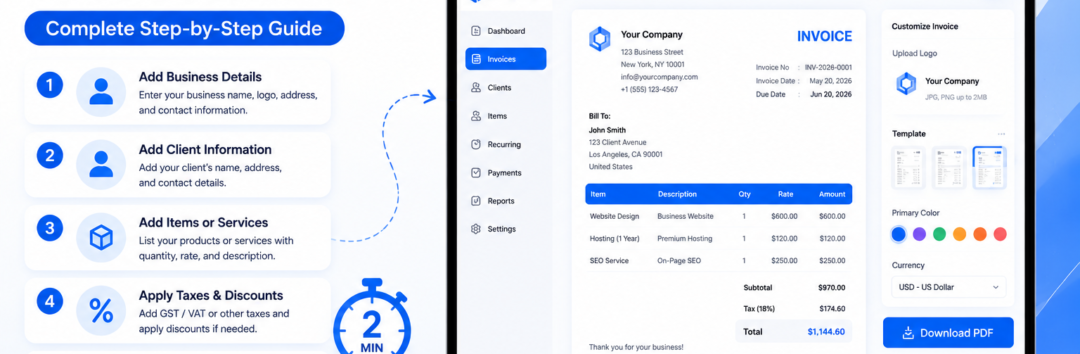
How to Create a Professional Invoice in Minutes | Free Step-by-Step Guide
Learn how to create a professional invoice in minutes using a free invoice generator. Discover invoice templates, GST invoices, payment terms, branding tips, and expert invoicing best practices.
How to Create a Professional Invoice in Minutes
Whether you’re a freelancer sending your first invoice, a startup owner managing multiple clients, or a growing agency handling recurring projects, getting paid on time starts with one thing—a professional invoice.
Many businesses still create invoices manually using spreadsheets or outdated documents. While this may seem convenient initially, it often leads to calculation errors, missing payment details, inconsistent branding, and delayed payments. Fortunately, modern Invoice Generator tools make the entire process faster, more accurate, and more professional.
Learning How to Create a Professional Invoice in Minutes is no longer just an administrative task—it’s an essential business skill that directly impacts your cash flow, credibility, and customer experience.
A professionally designed invoice does much more than request payment. It communicates trust, reinforces your brand, provides legal documentation, simplifies accounting, and helps clients process payments without confusion.
Features like Automatic Calculations, Invoice Preview, Invoice Customization, PDF Invoice Download, and Share Invoice via Email have transformed invoicing into a streamlined workflow that takes only a few minutes.
Whether you’re creating a Freelancer Invoice, a Small Business Invoice, a Consultant Invoice, or a GST-Compliant Invoice, following the right structure ensures your invoices look polished and get paid faster.
In this comprehensive guide, you’ll discover exactly How to Create a Professional Invoice in Minutes, what information every invoice should include, common mistakes to avoid, and how to use an online invoice creator to automate the entire process.
Why a Professional Invoice Matters More Than Ever
Think of your invoice as the final impression you leave after completing a project. Even if you’ve delivered exceptional work, sending an incomplete or poorly formatted invoice can create uncertainty and delay payment.
Imagine two web designers finishing identical projects.
The first sends a plain spreadsheet with only the total amount due.
The second sends a professionally branded invoice featuring a Business Logo, clear Business Information, complete Buyer Contact Information, an organized Bill To Section, an Invoice Number, payment instructions, Due Date, Payment Terms, and a downloadable PDF Invoice.
Which invoice inspires more confidence?
The answer is obvious.
Professional invoices help businesses:
- Build credibility
- Reduce payment delays
- Maintain organized financial records
- Improve customer trust
- Simplify bookkeeping
- Reduce disputes
- Strengthen brand identity
Today’s clients expect invoices that are easy to read, accurate, and professionally presented.
Benefits of Using an Online Invoice Generator
Modern businesses rarely create invoices from scratch anymore. Instead, they rely on an Online Invoice Creator that automates repetitive tasks while reducing costly mistakes.
Here are the biggest advantages.
Saves Valuable Time
Instead of designing invoices manually, you simply choose a Professional Invoice Template, enter your client information, add services, and generate a polished invoice within minutes.
Most businesses can complete the entire process in under five minutes.
Eliminates Manual Calculation Errors
One of the biggest invoicing mistakes comes from incorrect math.
An online Invoice Generator performs Automatic Calculations for:
- Quantity
- Unit Price
- Subtotal Calculation
- Discount Field
- Tax Calculation (GST/VAT/Sales Tax)
- Total Amount Due
This dramatically reduces human error.
Creates a Professional Brand Image
Consistency matters.
A customized invoice allows you to include:
- Business Logo
- Company colors
- Invoice Branding
- Professional typography
- Contact information
- Personalized notes
This small touch makes your business appear significantly more trustworthy.
Makes Payments Faster
Invoices with clearly defined Payment Methods, Due Date, and Payment Terms (Net 15 / Net 30) eliminate confusion.
Clients know:
- When to pay
- How to pay
- What they’re paying for
The easier you make payment, the faster you get paid.
Easy Sharing
Instead of printing paperwork, businesses now generate a Print-Ready Invoice, download a PDF Invoice, and instantly Share Invoice via Email.
Many invoice generators also support cloud storage and tracking.
Essential Elements Every Professional Invoice Must Include
Knowing How to Create a Professional Invoice in Minutes starts with understanding the anatomy of an effective invoice.
Every invoice should contain these essential sections.
1. Invoice Header
The Invoice Header immediately tells clients what the document represents.
Include:
- Invoice
- Company Name
- Logo
- Invoice Date
- Invoice Number
This improves organization for both parties.
2. Business Information
Your Business Information should include:
- Business Name
- Address
- Phone Number
- Email Address
- Website
- Tax Registration Number (if applicable)
For Indian businesses, include your GST details when creating a GST Invoice.
3. Buyer Contact Information
The Buyer Contact Information should clearly identify the customer.
Include:
- Client Name
- Company Name
- Billing Address
- Phone Number
This avoids confusion, especially for organizations handling multiple vendors.
4. Bill To Section
A dedicated Bill To Section ensures the invoice reaches the correct department or decision-maker.
This section becomes particularly important for larger organizations.
5. Invoice Number
Every invoice requires a unique Invoice Number.
A consistent numbering system helps with:
- Accounting
- Audits
- Tax filing
- Payment tracking
- Customer support
Example:
- INV-2026-001
- INV-2026-002
- INV-2026-003
6. Service Description
Instead of writing:
“Marketing Services”
Be specific.
Example:
SEO Strategy Development for June 2026 including keyword research, competitor analysis, on-page optimization, and monthly reporting.
A detailed Service Description minimizes disputes.
7. Itemized Line Items
Each service should appear as separate Itemized Line Items.
Example:
| Service | Quantity | Unit Price | Amount |
|---|---|---|---|
| SEO Audit | 1 | $200 | $200 |
| Keyword Research | 1 | $150 | $150 |
| Content Optimization | 1 | $250 | $250 |
This improves transparency.
8. Quantity and Unit Price
Every line item should specify:
- Quantity
- Unit Price
This makes pricing easy to verify.
9. Subtotal Calculation
Before taxes are applied, show the Subtotal Calculation.
Clients appreciate seeing exactly how totals are determined.
10. Discount Field
If you’ve offered promotional pricing or negotiated rates, clearly display the Discount Field.
Transparency builds trust.
11. Tax Calculation (GST/VAT/Sales Tax)
Taxes should never be hidden.
Display:
- Applicable tax type
- Tax percentage
- Tax Calculation (GST/VAT/Sales Tax)
For Indian businesses, a proper GST-Compliant Invoice should include GSTIN, HSN/SAC codes where applicable, taxable value, and GST breakup.
12. Total Amount Due
Highlight the Total Amount Due using larger text or bold formatting.
This should be the most visible number on the invoice.
Clients shouldn’t have to search for the final payable amount.
13. Payment Terms
Clear Payment Terms (Net 15 / Net 30) reduce misunderstandings.
Examples:
- Payment Due Within 15 Days
- Net 30
- Due Upon Receipt
Always define expectations upfront.
14. Due Date
Never assume the client knows when payment is expected.
Always specify the exact Due Date.
Example:
Due Date: July 31, 2026
This helps prevent unnecessary payment delays.
15. Payment Methods
Offer multiple Payment Methods whenever possible.
Examples include:
- Bank Transfer
- UPI
- Credit Card
- Debit Card
- PayPal
- Stripe
The fewer barriers to payment, the faster you’ll receive funds.
16. PDF Invoice Download
Always provide a PDF Invoice Download.
PDFs preserve formatting across devices and appear more professional than editable documents.
17. Share Invoice via Email
After reviewing the Invoice Preview, send the document using the Share Invoice via Email feature.
A professional email combined with a polished invoice significantly improves response rates.
Common Invoice Types You Should Know
Not every invoice serves the same purpose. Choosing the correct format ensures compliance and avoids confusion.
Freelancer Invoice
Designed for independent professionals billing clients for services such as writing, graphic design, consulting, or software development.
Small Business Invoice
Suitable for retail stores, agencies, service providers, and local businesses that require detailed billing with branding and payment terms.
Consultant Invoice
Typically includes project milestones, consulting hours, deliverables, and agreed billing rates.
GST Invoice
Mandatory for GST-registered businesses in India. A proper GST invoice includes tax details, GSTIN, HSN/SAC codes (where applicable), taxable value, and GST amounts.
Tax Invoice
Used whenever applicable taxes must be charged and documented for accounting and regulatory purposes.
Proforma Invoice
Issued before goods or services are delivered. It acts as a quotation and outlines expected costs but is not a payment request.
Commercial Invoice
Commonly used in international trade for customs clearance and cross-border shipments.
By selecting the right invoice type for your business scenario, you improve professionalism, reduce compliance issues, and ensure clients receive all the information they need.
How to Create a Professional Invoice in Minutes (Part 2)
Continue reading: In Part 1, we explored why professional invoices matter, the essential elements every invoice should include, and the different invoice types. In this section, you’ll learn the exact step-by-step process to create a professional invoice in minutes, discover branding best practices, understand compliance requirements, and avoid common invoicing mistakes that delay payments.
Step-by-Step: How to Create a Professional Invoice in Minutes
Now that you understand what makes an invoice professional, let’s walk through the exact process. Whether you’re using an Invoice Generator, accounting software, or an Online Invoice Creator, these steps remain the same.
Following this workflow will help you create an accurate, visually appealing invoice that encourages faster payments.
Step 1: Choose a Professional Invoice Template
The first step in How to Create a Professional Invoice in Minutes is selecting the right Professional Invoice Template.
Instead of designing an invoice from scratch, use a clean, modern template that reflects your business identity. A well-designed template saves time and ensures consistency across every invoice you send.
When choosing a template, look for:
- Minimalist and clean design
- Easy-to-read typography
- Clearly defined sections
- Mobile-friendly layout
- Space for your Business Logo
- Organized billing information
- Automatic tax calculations
- Professional color scheme
Avoid templates with excessive colors, decorative fonts, or unnecessary graphics. Clients value clarity more than complexity.
Pro Tip
Create one branded invoice template and reuse it for every client. This strengthens your Invoice Branding and makes your business instantly recognizable.
Step 2: Add Your Business Information
Your invoice represents your company, so accuracy is essential.
Double-check your Business Information, including:
- Business Name
- Business Address
- Phone Number
- Email Address
- Website
- GSTIN (if applicable)
- Tax Registration Number
If you’re a freelancer, include your professional website or portfolio link. This reinforces your credibility and provides clients with an easy way to contact you.
For registered businesses, ensure your legal business name matches official tax records.
Step 3: Enter Accurate Buyer Contact Information
Incorrect customer information can delay approvals and payments.
Always verify the Buyer Contact Information before sending your invoice.
Include:
- Client Name
- Company Name
- Billing Address
- Email Address
- Phone Number
- Department (if applicable)
Many medium and large organizations process hundreds of invoices every month. A small typo in the billing details could send your invoice to the wrong department.
Step 4: Complete the Bill To Section
The Bill To Section should clearly identify the person or organization responsible for making the payment.
If you’re working with enterprise clients, include:
- Accounts Payable Department
- Purchase Order Reference
- Client Tax ID (if required)
- Project Name
The more specific you are, the fewer payment delays you’ll experience.
Step 5: Assign a Unique Invoice Number
Every invoice should have its own Invoice Number.
Avoid naming invoices like:
Invoice 1
Invoice Final
Invoice Latest
Instead, use a structured numbering system such as:
- INV-2026-0001
- INV-2026-0002
- INV-2026-0003
This makes searching, auditing, and payment tracking significantly easier.
A consistent numbering convention is especially useful when managing dozens or hundreds of invoices each month.
Step 6: Add Clear Service Descriptions
One of the most overlooked parts of invoicing is writing a detailed Service Description.
Instead of:
Marketing Services
Write:
SEO Strategy Development, Technical SEO Audit, Keyword Research, Content Optimization, and Monthly Performance Reporting for June 2026.
Detailed descriptions reduce client questions and demonstrate the value of your work.
If you sell products, include:
- Product Name
- SKU
- Model Number
- Variant
- Specifications
The goal is complete transparency.
Step 7: Organize Itemized Line Items
Rather than combining everything into one total, break your services into Itemized Line Items.
Example:
| Service | Quantity | Unit Price | Amount |
|---|---|---|---|
| SEO Audit | 1 | $300 | $300 |
| Keyword Research | 1 | $250 | $250 |
| Blog Optimization | 5 | $80 | $400 |
| Technical SEO Fixes | 1 | $350 | $350 |
Itemization improves trust because clients can easily understand how the final amount was calculated.
Step 8: Verify Quantity and Unit Price
Each service should display:
- Quantity
- Unit Price
Examples:
5 Articles × $100
10 Consulting Hours × $75
20 Product Units × $30
This clarity reduces disputes and simplifies accounting for both parties.
Step 9: Review Automatic Calculations
One of the biggest advantages of using an Invoice Generator is Automatic Calculations.
The software instantly computes:
- Subtotal Calculation
- Taxes
- Discounts
- Grand Total
Always verify these numbers before sending your invoice.
Although automation minimizes errors, it’s still good practice to perform a quick review.
Step 10: Apply Discounts Transparently
If you’ve negotiated pricing, display it using the Discount Field.
Example:
Project Value: $2,000
Returning Client Discount: -$200
New Total: $1,800
Clients appreciate seeing exactly how discounts were applied.
Transparency builds stronger business relationships.
Step 11: Calculate Taxes Correctly
Every country has different tax regulations.
Depending on your location, your invoice may require:
- Tax Calculation (GST/VAT/Sales Tax)
- Tax Percentage
- Tax Amount
- Registration Number
For Indian businesses, generating a GST-Compliant Invoice is essential.
A compliant GST invoice typically includes:
- GSTIN
- Invoice Number
- Invoice Date
- Place of Supply
- HSN/SAC Code (where applicable)
- CGST
- SGST
- IGST
- Taxable Value
Incorrect tax calculations may create accounting problems later.
Step 12: Display the Total Amount Due Clearly
Your Total Amount Due should immediately stand out.
Use:
- Larger font size
- Bold formatting
- White space
- Highlight box
Clients shouldn’t have to search for the amount they owe.
This simple design improvement often reduces payment delays.
Step 13: Define Payment Terms
Many payment disputes occur because expectations weren’t clearly communicated.
Specify your Payment Terms (Net 15 / Net 30).
Common examples:
- Due Upon Receipt
- Net 7
- Net 15
- Net 30
- Net 45
Include any late payment fees if applicable.
For example:
Payments received after the due date may incur a 2% late fee per month.
Professional communication reduces misunderstandings.
Step 14: Add the Due Date
Never rely solely on payment terms.
Always include a clearly visible Due Date.
Example:
Invoice Date: July 1, 2026
Due Date: July 15, 2026
Specific dates are easier for clients to process than vague payment windows.
Step 15: Offer Flexible Payment Methods
The easier it is to pay, the faster you’ll receive payment.
Offer multiple Payment Methods, such as:
- UPI
- Bank Transfer
- Credit Card
- Debit Card
- PayPal
- Stripe
- Razorpay
Businesses increasingly expect digital payment options.
Adding QR codes or secure payment links can further improve convenience.
Step 16: Preview Before Sending
Never send an invoice without reviewing the Invoice Preview.
Check for:
- Spelling mistakes
- Incorrect totals
- Missing taxes
- Wrong client details
- Broken branding
- Formatting issues
A two-minute review can prevent embarrassing mistakes.
Step 17: Download and Send Your Invoice
Once everything looks correct:
- Generate a PDF Invoice Download
- Save a copy for your records
- Share Invoice via Email
Always use PDF format because it preserves formatting across all devices.
Include a polite email message summarizing:
- Project completed
- Invoice attached
- Payment due date
- Thank you note
Professional communication encourages faster responses.
Branding Tips That Make Your Invoice Look Premium
Professional invoices are an extension of your brand.
Small improvements can dramatically increase perceived professionalism.
Consider adding:
- Your Business Logo
- Brand colors
- Professional typography
- Consistent spacing
- Personalized thank-you note
- Company website
- Social media links
- Customer support email
These details reinforce your identity and leave a lasting impression.
Remember, every invoice is another opportunity to market your business.
Common Mistakes That Delay Client Payments
Even experienced business owners make invoicing mistakes.
Here are some of the most common issues to avoid:
Missing Invoice Number
Without a proper Invoice Number, clients may struggle to track or approve your invoice.
Incomplete Business Information
Missing contact details reduce credibility and make communication difficult.
Incorrect Buyer Contact Information
Invoices sent to the wrong department often remain unpaid for weeks.
Vague Service Description
Generic descriptions like “Consulting Services” don’t provide enough detail.
Always explain what work was completed.
Missing Due Date
If clients don’t know when payment is expected, they may postpone it.
Hidden Taxes
Clearly display every Tax Calculation (GST/VAT/Sales Tax) to avoid disputes.
Poor Invoice Branding
An invoice without branding appears less trustworthy than one with a recognizable Business Logo and professional formatting.
Sending Editable Documents
Never send Word or Excel files.
Always generate a PDF Invoice Download before emailing your client.
Forgetting Payment Methods
If clients don’t know how to pay, payment will almost certainly be delayed.
Always include multiple Payment Methods.
Skipping the Final Review
Always inspect your Invoice Preview before clicking send.
Small mistakes create unnecessary delays and damage your professional image.
Best Practices Used by Successful Businesses
Companies that consistently receive faster payments often follow the same invoicing habits:
- Send invoices immediately after completing work.
- Use sequential invoice numbering.
- Maintain consistent branding across every invoice.
- Clearly define payment terms.
- Keep service descriptions detailed and transparent.
- Offer multiple digital payment methods.
- Save all invoices for accounting and tax purposes.
- Automate repetitive tasks using an Invoice Generator.
- Follow up politely before and after the due date.
- Keep communication professional and courteous.
By implementing these best practices, you’ll not only streamline your invoicing process but also improve client relationships, strengthen your brand, and accelerate cash flow.
How to Create a Professional Invoice in Minutes Part 3
Advanced Strategies to Create a Professional Invoice in Minutes
Creating an invoice is only the beginning. The real goal is to build an invoicing system that saves time, minimizes manual work, and ensures you get paid consistently.
As your business grows, you’ll likely handle dozens—or even hundreds—of invoices every month. Without an organized workflow, tracking payments, managing taxes, and following up with clients can become overwhelming.
This is where automation and modern invoicing practices make a significant difference.
Automate Your Invoicing Workflow
One of the biggest advantages of using an Invoice Generator is automation.
Instead of creating every invoice from scratch, modern invoicing platforms let you build reusable templates, calculate totals automatically, and generate invoices in just a few clicks.
Automation helps you:
- Reduce repetitive administrative work
- Eliminate manual calculation errors
- Standardize invoice formatting
- Improve payment consistency
- Save hours every month
For example, a digital marketing agency managing 40 monthly clients can create one branded invoice template and reuse it for every billing cycle. The only changes required are client details, project descriptions, and billing amounts.
Create Reusable Invoice Templates
Every business should maintain a master Custom Invoice Template.
A reusable template should already include:
- Business Information
- Business Logo
- Company address
- Contact details
- Default Payment Terms
- Preferred Payment Methods
- Brand colors
- Footer information
- Thank-you message
With these details pre-filled, creating a new invoice takes only a few minutes.
Use Recurring Invoices for Regular Clients
If you work with retainer clients or subscription-based customers, manually creating invoices every month wastes valuable time.
Instead, enable Recurring Invoice functionality.
Recurring invoices automatically generate invoices at predefined intervals such as:
- Weekly
- Monthly
- Quarterly
- Annually
This feature is particularly useful for:
- SEO agencies
- Marketing consultants
- Web hosting companies
- Software subscriptions
- Maintenance services
- Coaching businesses
- Accounting firms
Automation reduces missed invoices and ensures consistent revenue.
Keep Track of Every Invoice
Creating invoices is only one part of effective financial management.
You also need visibility into their status.
A modern invoicing system should allow you to monitor:
- Draft invoices
- Sent invoices
- Viewed invoices
- Paid invoices
- Pending invoices
- Overdue invoices
Using Invoice Status Tracking gives you a clear overview of your receivables and helps identify payments that require follow-up.
Instead of relying on spreadsheets, you’ll know exactly which invoices still need attention.
Monitor Client Payment Tracking
One of the biggest challenges for freelancers and small businesses is late payments.
Good Client Payment Tracking helps answer questions like:
- Which clients consistently pay on time?
- Which invoices are overdue?
- Which customers require reminders?
- What is your average payment cycle?
Tracking these metrics helps improve forecasting and cash flow planning.
Many businesses create a monthly payment dashboard to monitor outstanding invoices and prioritize follow-ups.
Send Friendly Payment Reminders
Late payments don’t always happen intentionally.
Sometimes clients simply forget.
Instead of waiting weeks, use Overdue Payment Reminder features available in many invoice generators.
Best practice reminder schedule:
- Reminder 3 days before the due date
- Reminder on the due date
- Reminder 7 days after the due date
- Final reminder after 14 days
Keep reminders professional and courteous.
Maintaining positive client relationships is just as important as collecting payments.
Convert Quotes into Invoices
Many businesses start with project estimates before work begins.
Instead of recreating invoices manually, use Quote to Invoice functionality.
The process is simple:
- Create a quotation.
- Send it to the client.
- Receive approval.
- Convert it directly into an invoice.
This eliminates duplicate work and reduces the chances of pricing inconsistencies.
It’s especially valuable for agencies, contractors, consultants, and service providers who prepare proposals regularly.
Include Purchase Order References
Many medium and large organizations require a Purchase Order Reference before processing invoices.
If your client provides a purchase order number, include it prominently on the invoice.
Benefits include:
- Faster approval
- Easier accounting
- Reduced payment delays
- Better record management
Enterprise clients often reject invoices that don’t reference the correct purchase order.
Add Clear Terms and Conditions
A professional invoice should also include concise Terms and Conditions.
These may cover:
- Payment deadlines
- Refund policy
- Revision limits
- Ownership of deliverables
- Late payment charges
- Accepted payment methods
Keeping these terms visible protects both you and your client while minimizing misunderstandings.
Accept Payments in Multiple Currencies
If you work with international clients, a Multi-Currency Support feature is invaluable.
Global businesses often invoice in:
- USD
- EUR
- GBP
- CAD
- AUD
- AED
- SGD
Choosing the correct Currency Selector ensures clients see familiar pricing and simplifies international transactions.
It also reduces confusion caused by exchange rate conversions.
Create Professional International Invoices
International clients often expect more detailed documentation than domestic customers.
When preparing invoices for overseas businesses, include:
- Full legal business information
- Tax identification numbers (where applicable)
- International bank account details
- SWIFT/BIC codes
- Currency used
- Country-specific tax requirements
For import/export businesses, a Commercial Invoice may also include shipping information, customs declarations, and product classifications.
Providing complete documentation helps prevent payment delays and customs issues.
Maintain GST Compliance
Businesses operating in India must ensure every GST-Compliant Invoice follows applicable regulations.
A compliant invoice generally includes:
- GSTIN
- Invoice Number
- Invoice Date
- Place of Supply
- Taxable Value
- CGST
- SGST
- IGST
- HSN/SAC Codes (where required)
Maintaining proper GST documentation simplifies return filing and reduces compliance risks during audits.
Organize Your Invoice History
As your business grows, keeping an organized Invoice History becomes increasingly important.
Rather than storing invoices across multiple folders, maintain a centralized archive.
Sort invoices by:
- Year
- Client
- Invoice Number
- Payment Status
- Project
Quick access to historical invoices helps during audits, tax preparation, and customer support.
Cloud-based storage also ensures your records remain accessible from anywhere.
Protect Your Brand with Consistent Invoice Branding
Brand consistency extends beyond your website and marketing materials.
Every invoice should reinforce your professional identity.
Include:
- Business Logo
- Brand colors
- Professional typography
- Consistent layout
- Footer message
- Contact information
- Website URL
Consistent Invoice Branding increases recognition and builds long-term trust with clients.
A polished invoice reflects the quality of your work.
Use Digital Signatures for Added Trust
Some industries require additional verification before invoices are processed.
Adding a Digital Signature helps:
- Verify authenticity
- Reduce disputes
- Improve professionalism
- Streamline approvals
Digital signatures are particularly useful for consultants, legal professionals, architects, engineers, and government contractors.
Why PDF Is Still the Best Invoice Format
Although editable documents are convenient internally, clients should always receive a PDF Invoice Download.
Benefits of PDF invoices include:
- Preserved formatting
- Universal compatibility
- Professional presentation
- Reduced editing risks
- Smaller file sizes
- Easy archiving
After reviewing the Invoice Preview, generate the final PDF before sending it.
Email Invoices Professionally
After creating your invoice, don’t overlook the importance of your email.
When you Share Invoice via Email, keep your message concise and professional.
Include:
- A polite greeting
- Project reference
- Invoice number
- Payment amount
- Due date
- Appreciation for the client’s business
A clear email complements your invoice and encourages prompt action.
Improve Cash Flow Through Better Invoicing Habits
Learning How to Create a Professional Invoice in Minutes isn’t just about saving time—it’s about improving your business’s financial health.
Businesses with efficient invoicing systems often experience:
- Faster payment cycles
- Fewer overdue invoices
- Better customer relationships
- Improved financial forecasting
- More predictable monthly revenue
Simple practices like sending invoices immediately after project completion, offering multiple Payment Methods, monitoring Invoice Status Tracking, and using Recurring Invoice automation can significantly improve your cash flow.
Remember, the sooner your client receives a clear and professional invoice, the sooner they’re likely to pay.
By combining automation, accurate documentation, consistent branding, and proactive payment tracking, you’ll create an invoicing process that supports long-term business growth while reducing administrative effort.
Frequently Asked Questions (FAQs)
These FAQs are optimized for search intent, Google’s People Also Ask (PAA) section, and featured snippets.
1. What is a professional invoice?
A professional invoice is a formal billing document sent by a business, freelancer, or consultant to request payment for products or services provided. It contains essential details such as the Invoice Number, Business Information, Buyer Contact Information, Itemized Line Items, Service Description, Subtotal Calculation, Tax Calculation (GST/VAT/Sales Tax), Total Amount Due, Payment Terms, and Due Date.
A professionally designed invoice improves credibility, reduces payment delays, and simplifies accounting.
2. How do I create a professional invoice in minutes?
The easiest way to learn How to Create a Professional Invoice in Minutes is by using an Online Invoice Creator or Invoice Generator.
Simply:
- Choose a Professional Invoice Template
- Add your Business Information
- Enter your client’s billing details
- Add products or services as Itemized Line Items
- Verify Automatic Calculations
- Include taxes and discounts
- Review the Invoice Preview
- Generate a PDF Invoice Download
- Share Invoice via Email
Most invoices can be completed in less than five minutes.
3. What information should every invoice include?
Every invoice should contain:
- Business name
- Business Logo
- Invoice date
- Invoice Number
- Client information
- Bill To Section
- Product or Service Description
- Quantity
- Unit Price
- Subtotal Calculation
- Tax details
- Total Amount Due
- Payment Terms
- Due Date
- Accepted Payment Methods
Missing any of these details may delay payment or create confusion.
4. Why is an invoice number important?
A unique Invoice Number allows businesses to organize invoices, track payments, prepare tax reports, and resolve customer inquiries quickly.
Sequential numbering also simplifies bookkeeping and financial audits.
5. What is the difference between a proforma invoice and a tax invoice?
A Proforma Invoice is issued before goods or services are delivered and serves as a quotation or estimate.
A Tax Invoice, however, is an official billing document used after a sale has been completed and includes applicable tax information for accounting and legal compliance.
6. What is a GST-compliant invoice?
A GST-Compliant Invoice follows Goods and Services Tax regulations and generally includes:
- GSTIN
- Invoice Number
- Invoice Date
- Taxable Value
- GST breakup (CGST, SGST, IGST)
- HSN/SAC Codes (where applicable)
Businesses registered under GST should ensure every invoice meets these requirements.
7. What payment methods should I include on an invoice?
To encourage faster payments, provide multiple Payment Methods, such as:
- Bank Transfer
- UPI
- Credit Card
- Debit Card
- PayPal
- Stripe
- Razorpay
Giving clients flexible payment options reduces payment friction.
8. Should I send invoices in PDF format?
Yes.
A PDF Invoice Download preserves formatting across all devices, prevents accidental edits, and presents a more professional appearance than Word or Excel files.
PDF remains the preferred invoice format for most businesses.
9. How can I make my invoices look more professional?
Improve your invoice by adding:
- Your Business Logo
- Consistent Invoice Branding
- Professional typography
- Organized layout
- Clear pricing
- Detailed Service Description
- Multiple Payment Methods
- A polite thank-you note
Small design improvements can significantly enhance your brand image.
10. How do recurring invoices work?
A Recurring Invoice automatically generates invoices on a fixed schedule, such as weekly, monthly, or annually.
This feature is ideal for:
- Marketing agencies
- Consultants
- Subscription businesses
- Maintenance providers
- Software companies
Recurring invoices save time and ensure clients receive invoices consistently.
11. Can I invoice international clients?
Absolutely.
When invoicing overseas customers, ensure your invoice includes:
- Correct currency
- International banking details
- Applicable tax information
- Country-specific legal requirements
Using Multi-Currency Support makes international invoicing much easier.
12. What are the most common invoice mistakes?
Common invoicing mistakes include:
- Missing Invoice Number
- Incorrect client information
- Incomplete Business Information
- Hidden taxes
- Missing Due Date
- Vague Service Description
- Sending editable documents instead of PDFs
- Forgetting payment instructions
Avoiding these mistakes helps you get paid faster.
13. How do I track unpaid invoices?
Modern invoicing software provides Invoice Status Tracking and Client Payment Tracking.
You can monitor whether an invoice is:
- Draft
- Sent
- Viewed
- Paid
- Pending
- Overdue
Many platforms also send Overdue Payment Reminder notifications automatically.
14. Can I customize my invoice?
Yes.
Most invoice generators allow complete Invoice Customization, including:
- Company logo
- Brand colors
- Fonts
- Footer
- Payment instructions
- Notes to clients
Customized invoices reinforce your professional identity.
15. Why should I use an invoice generator instead of spreadsheets?
An Invoice Generator offers several advantages over manual spreadsheets:
- Automatic Calculations
- Professional templates
- Faster invoice creation
- Better organization
- Reduced human error
- Easier payment tracking
- PDF export
- Email sharing
- Invoice history
- Automation features
For most businesses, invoice generators are more efficient and scalable than traditional spreadsheets.
Learning How to Create a Professional Invoice in Minutes is one of the simplest ways to improve your business operations, strengthen your professional image, and accelerate cash flow.
A well-designed invoice does much more than request payment—it reflects your brand, demonstrates professionalism, and creates a seamless experience for your clients.
By using a reliable Invoice Generator, selecting a clean Professional Invoice Template, maintaining consistent Invoice Branding, providing accurate Business Information, organizing Itemized Line Items, displaying transparent Tax Calculations, and clearly defining Payment Terms, you make it easier for clients to approve and pay invoices without unnecessary delays.
As your business grows, features like Recurring Invoice, Invoice Status Tracking, Client Payment Tracking, Quote to Invoice, and PDF Invoice Download become increasingly valuable. They reduce administrative work, improve financial organization, and free up more time to focus on delivering excellent products and services.
Remember, invoicing isn’t just an accounting task—it’s an important part of the customer experience. Every invoice you send reinforces your professionalism and contributes to your business reputation.
Whether you’re a freelancer, consultant, agency owner, startup founder, or established business, implementing the strategies outlined in this guide will help you build a faster, smarter, and more reliable invoicing process.
Call to Action
Ready to simplify your billing process?
Start using a professional Invoice Generator today to create branded, accurate, and compliant invoices in just a few minutes. Choose a customizable Professional Invoice Template, automate calculations, send secure PDF Invoice files, and track payments effortlessly.
The sooner you streamline your invoicing workflow, the sooner you’ll spend less time on paperwork and more time growing your business.
Create your next professional invoice today—and get paid with confidence.
Also Read: Best Free PDF Invoice Generator Compared: Top Online Invoice Makers Reviewed